A well-planned home server lab starts with a clean network design, consistent addressing, and clear boundaries between services and device types to ensure reliability, security, and observability from day one. Modern homelabs benefit from virtualization platforms, a manageable switch with VLANs, and a firewall that enforces segmentation while enabling safe remote access via VPN rather than public port exposure.
Lab goals and outcomes
The goal is to create an environment for self‑hosting, development, and security testing that mirrors real infrastructure patterns without enterprise complexity or cost. Outcomes include predictable addressing, service discoverability, fast recovery via backups and snapshots, and safe egress/ingress controls for experiments.
Reference hardware
Quiet, power‑efficient hardware is preferable to re‑racked enterprise gear unless high core counts and memory are mandatory, because noise and heat become constraints in living spaces. Typical builds use a small form factor x86 box with multiple NICs, a managed gigabit or 2.5G switch, and optional low‑TDP NAS drives for always‑on storage.
Core software stack
A pragmatic baseline pairs a hypervisor such as Proxmox VE for VMs/containers with a storage layer like ZFS or a dedicated NAS OS, plus Docker for application services. For network services, a firewall/router platform like pfSense or OPNsense provides routing, VLANs, DHCP, DNS, and VPN termination in one place.
Network design principles
Segment devices by function using VLANs, then assign a dedicated IP subnet to each segment for clean policy and troubleshooting boundaries. Keep IoT and guest devices isolated from servers and management networks, allowing only the minimal east‑west access required for specific services.
Subnets and CIDR planning
Use private RFC1918 ranges and avoid overlaps with common office/VPN defaults to prevent route conflicts during remote work or site‑to‑site labs. A typical structure allocates a /24 for each VLAN to simplify mental models and DHCP reservations while leaving room for growth.
Example allocation (descriptive):
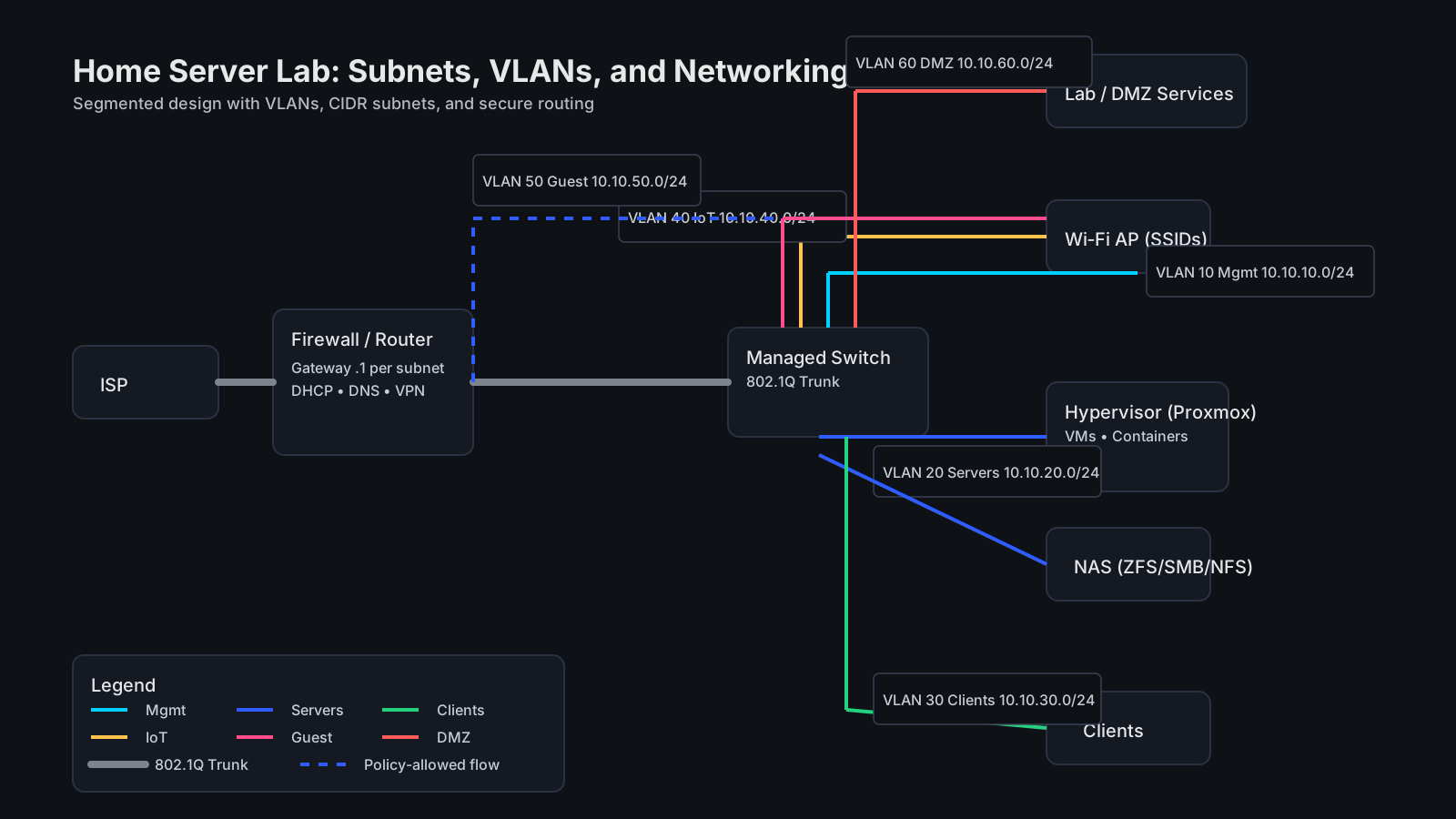
- Management: 10.10.10.0/24 (firewall, switches, hypervisor, out‑of‑band)[^6]
- Servers: 10.10.20.0/24 (VMs, containers, NAS services)[^5]
- Clients: 10.10.30.0/24 (desktops, laptops)[^3]
- IoT: 10.10.40.0/24 (cameras, smart devices)[^4]
- Guest Wi‑Fi: 10.10.50.0/24 (internet‑only)[^1]
- Lab/DMZ: 10.10.60.0/24 (exposed test apps behind reverse proxy)[^6]
VLANs and trunks
Configure access ports per device type and use one or more 802.1Q trunks between the firewall/router and the managed switch to carry multiple VLANs on a single uplink. Tag SSIDs to VLANs on the access point so guest and IoT traffic enters the correct subnet without L2 bleed into sensitive networks.
Routing, firewalling, and NAT
Establish inter‑VLAN routing on the firewall and default‑deny rules between segments, then explicitly permit service‑level access like DNS from clients to servers or NTP to the firewall. Prefer VPN or a reverse proxy with strong auth over raw port forwards, minimizing the public attack surface while preserving remote usability.
DHCP, DNS, and naming
Run DHCP per subnet with non‑overlapping pools and static reservations for infrastructure nodes such as the hypervisor, NAS, and monitoring server. Provide local DNS for service discovery and readable hostnames, optionally adding ad‑blocking DNS for client subnets if desired.
Remote access
Implement WireGuard or a mesh VPN such as Tailscale to reach internal services securely without exposing multiple ports to the internet. Apply per‑user keys with device approval and limit VPN peers to the subnets actually needed for operations and maintenance.
Virtualization layout
Use a hypervisor bridge to place selected VMs/containers directly on the target VLAN, or NAT‑style networks for disposable testbeds isolated from the rest of the lab. Keep templates for frequently used guest OS images and script provisioning to accelerate repeatable builds.
Storage, backup, and snapshots
Adopt the 3‑2‑1 backup pattern: three copies, two media types, one offsite or offline, and practice restore drills regularly. Use snapshots for fast rollback of patching or configuration errors, and test replication between the hypervisor datastore and NAS.
Monitoring and logging
Deploy basic telemetry early: node exporters, syslog shipping, and uptime checks to catch regressions after network or firmware changes. Centralize logs for the firewall, hypervisor, and critical services, and set sane retention aligned to storage capacity.
Example topology
A compact yet robust layout places the firewall/router at the edge, a managed switch as the distribution layer, APs for Wi‑Fi VLANs, and the hypervisor host on tagged trunks for multi‑VLAN workloads. A NAS resides on the servers VLAN with NFS/SMB exports restricted by host ACLs and firewall rules.
[ISP] ── [Firewall/Router] ── trunk ── [Managed Switch] ── access ── [APs/Clients/IoT]
                                     └─ trunk ── [Hypervisor/NAS]
This pattern supports clean segmentation, simple scaling, and clear troubleshooting paths using per‑VLAN captures and interface counters.
Step‑by‑step build plan
- Define subnets, VLAN IDs, and naming conventions, reserving address space for infra and DHCP pools per segment.[^6]
- Rack or place gear with airflow in mind, connect the firewall to the switch, and tag the trunk for required VLANs.[^3]
- Stand up the hypervisor, create a management NIC, and add virtual bridges per target VLAN as needed.[^5]
- Configure DHCP/DNS, create firewall rules with default‑deny between VLANs, and allow only specific services.[^6]
- Deploy a VPN, verify remote reachability, and disable any unnecessary port forwards from the ISP router.[^4]
- Add monitoring, logging, and backup jobs, then snapshot golden images and document recovery steps.[^1]
Security best practices
Block L2‑L7 lateral movement by default and allow minimum traffic required for each workflow, especially between IoT and servers. Keep firmware and container images updated and avoid exposing admin panels directly to the internet without MFA and IP restrictions.
Troubleshooting tips
Validate VLAN tagging with switch port counters and test per‑subnet DHCP/DNS before layering applications to reduce compounding failures. Use simple tools like ping, traceroute, and iperf within each segment to baseline latency and throughput during changes.
Example addressing sheet
Reserve low addresses for gateway, infra, and services, then carve a DHCP pool that avoids reserved static ranges for clean separation and auditability.
VLAN 10 (Mgmt): 10.10.10.0/24
  .1  Firewall GW
  .2  Switch Mgmt
  .10 Hypervisor
  DHCP: 10.10.10.100-10.10.10.199
VLAN 20 (Servers): 10.10.20.0/24
  .1  Firewall GW
  .10 NAS
  .20 Reverse Proxy
  DHCP: 10.10.20.100-10.10.20.199
VLAN 30 (Clients): 10.10.30.0/24
  .1  Firewall GW
  DHCP: 10.10.30.50-10.10.30.249
VLAN 40 (IoT): 10.10.40.0/24
  .1  Firewall GW
  DHCP: 10.10.40.50-10.10.40.249
VLAN 50 (Guest): 10.10.50.0/24
  .1  Firewall GW
  DHCP: 10.10.50.50-10.10.50.249
VLAN 60 (Lab/DMZ): 10.10.60.0/24
  .1  Firewall GW
  DHCP: 10.10.60.50-10.10.60.249
This structure supports clear firewall policies, predictable addressing, and straightforward capacity planning for future services.
Networking glossary
- Subnet: A partition of an IP network defined by a prefix length that controls address range and broadcast domain boundaries.
- CIDR: Classless Inter‑Domain Routing notation, written as a prefix and length like 10.10.20.0/24 to denote the address block size.
- VLAN: Virtual LAN that segments layer‑2 domains over shared physical links using 802.1Q tags and per‑VLAN subnets.
- Trunk: A tag‑carrying link that transports multiple VLANs between devices such as firewalls, switches, and hypervisors.
- Access port: An untagged switch port that carries a single VLAN for end devices like clients or IoT nodes.
- NAT/PAT: Network and Port Address Translation to map internal private addresses to public or shared addresses for egress.
- DHCP: Dynamic Host Configuration Protocol to assign IP, gateway, DNS, and lease parameters to hosts automatically.
- DNS: Domain Name System used to resolve hostnames to IP addresses for local and internet services.
- ACL/Firewall rule: Policy that allows or denies flows between subnets, ports, or applications at various OSI layers.
- MTU: Maximum Transmission Unit specifying the largest frame size on a link, relevant for tunnels and overlays.
- LAG/LACP: Link aggregation mechanisms to bundle multiple physical links for redundancy and higher throughput.
- STP: Spanning Tree Protocol preventing loops in switched topologies by controlling forwarding states.
- ARP/NDP: Address resolution protocols for IPv4/IPv6 mapping of IP to MAC on local segments.
- UPnP: Automatic port mapping feature that should be disabled on untrusted segments due to exposure risk.
Starter service ideas
Useful early services include reverse proxying with TLS, centralized logging, metrics, an internal container registry, and a software mirror/cache to reduce external bandwidth. Add a credential vault and secrets management for deploy pipelines to avoid embedding secrets in images or compose files.
Expand and iterate
Introduce a lab/DMZ VLAN for internet‑facing experiments behind a reverse proxy, with explicit egress and no inbound exposure outside the proxy. Iterate by documenting changes, maintaining diagrams, and reviewing rules quarterly to align with evolving services and threat models.
References
-
https://www.reddit.com/r/homelab/comments/1k4kukc/i_wrote_a_detailed_guide_on_choosing_the_best/
-
https://www.joekarlsson.com/2023/09/how-to-get-started-building-a-homelab-server-in-2024/
-
https://networklessons.com/miscellaneous/how-to-build-a-network-home-lab
-
https://mattadam.com/2025/08/27/the-ultimate-home-lab-setup-guide-for-beginners/